Instagram accounts can be connected to Lomavis in two different ways.
Connect via Meta Business Manager (recommended)
Connect directly with the Instagram account
Instagram accounts can only be connected if they have the status of a professional or creator account. Please follow the official guide to check this: https://help.instagram.com/502981923235522
If a Facebook page exists for the Instagram account, the connection should be made this way so that all features are available. Please follow the
Please check whether you have access to the Facebook page that the Instagram account should be connected to. A detailed guide is available here: https://help.lomavis.com/de/articles/829-facebook-seite-verbinden
If a Facebook page is deactivated or deleted, then no publishing via this page can be carried out. Please open the page on Facebook and check that it’s publicly available.
To connect an Instagram account with a Facebook page, the Facebook account you use must have the admin role in the page management and in Business Manager.
Permissions in Business Manager can be assigned in the following way: https://www.facebook.com/business/help/299504287548592/
To connect and confirm an Instagram account with a Facebook page, open the desired Facebook page and follow these steps:
Open the Facebook page (a list can be accessed here: https://www.facebook.com/pages/?category=your_pages)
Switch to the business page
Open the settings in the left menu
Open the “Linked accounts” menu item in the left menu
If an Instagram account is already linked, check whether the connection still needs to be confirmed. If that’s the case, confirm the connection
If an Instagram account is already linked, check that all permissions for the connection are allowed.
If no Instagram account is linked yet, link your Instagram account and follow the steps shown.
In Meta Business Suite you have to check whether access to the asset of the Instagram business account is set up correctly. It’s important that all permissions for full functionality are granted. To do this, open Business Manager and open the settings of the relevant business portfolio: https://business.facebook.com/latest/settings/
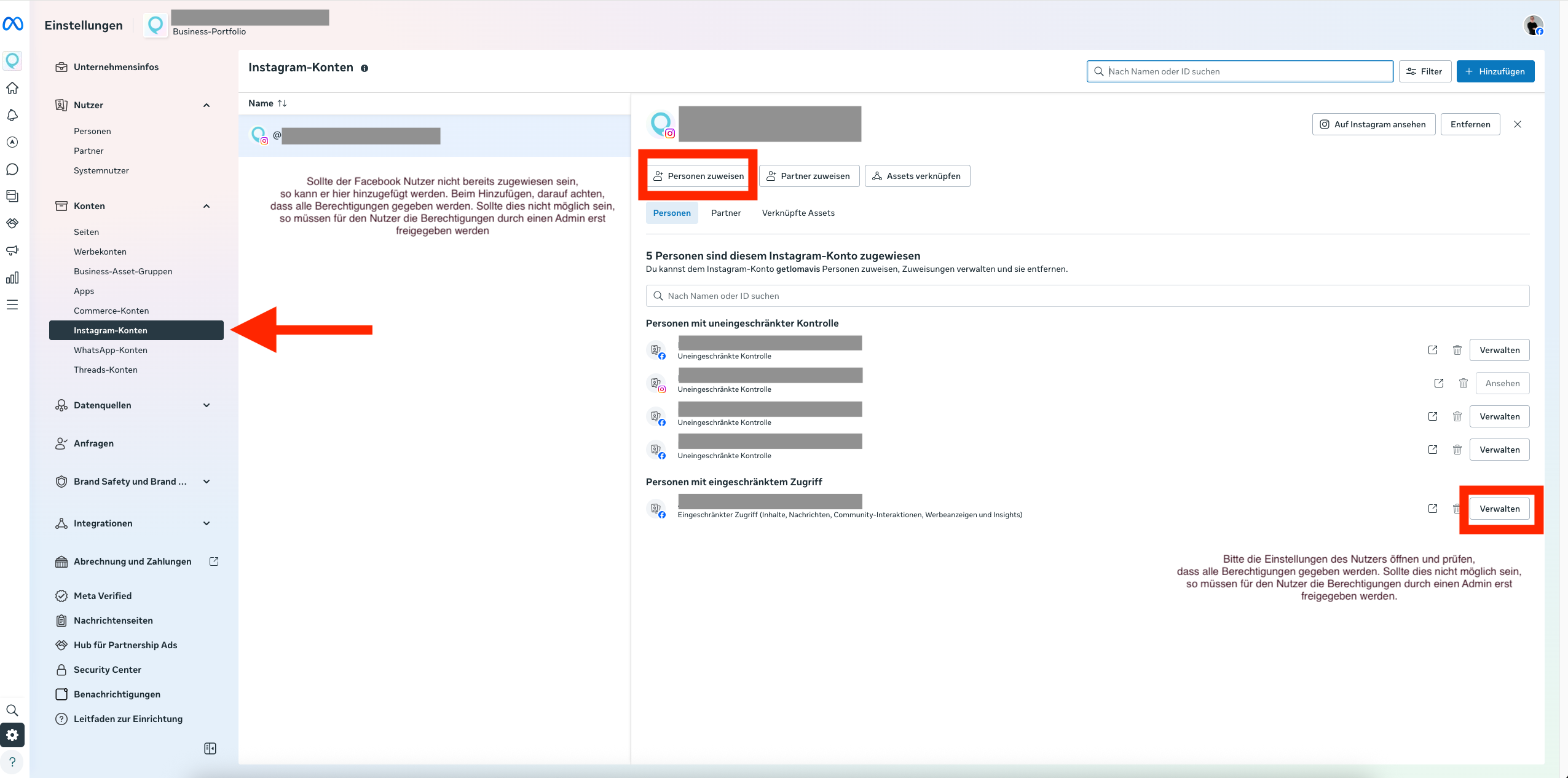
Facebook lets you set permissions for apps like Lomavis individually. To check whether Lomavis has access here, do the following:
Make sure your personal Facebook account is selected in the top right. If you’re currently acting as a Page, switch back to your Facebook account
Open the following link to open the business integrations: https://www.facebook.com/settings/?tab=business_tools
Click on "Edit" in the Lomavis row to open the permissions.
Make sure that the Facebook Page and the Instagram account are enabled for all permissions and/or that the toggle is turned on
An Instagram account can also be connected without a Facebook Page. In this step, the Instagram account is connected directly to Lomavis via the Instagram login.
 Questions and answers
When an Instagram account is linked via a Facebook Page, all of Meta’s business features are available, like tagging products and other people. Meta doesn’t offer these options for Instagram accounts that are connected directly.
